Showing posts with label Tech. Show all posts

Tuesday, August 11, 2015

Create the PERFECT FACEBOOK GRAPHIC

Hi there, it's me again 
Michelle Dupuis 
with a blog post for
 Techy Tuesday.


Do you know how to create the perfect graphic for FACEBOOK?

For the longest time, I did NOT know how 
and that bugged me.

This is what my page looked like.
I always had a lot of wasted space and my pictures were never centered.


Then, one day I was listening to Kim Garst on Periscope and I think she was talking to ME. I loved her scope and immediately started changing the way I create my graphics.

This is how I create the 
graphics now:

1) Go to Canva and register...
it's FREE!

2) Click on Use custom dimensions


3) Enter 900 X 900 and then click on DESIGN


This is what your page 
will look like


Now, you can play around with colors, 
backgrounds and fonts.

Background
Click here (red arrow)
 and choose a color.


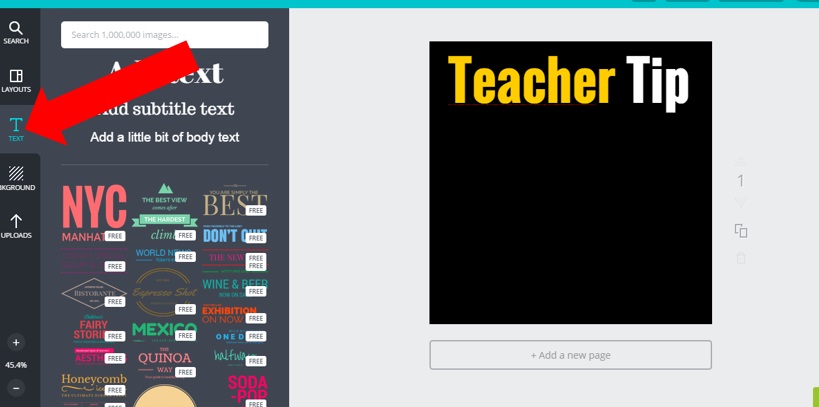
Click on Text and write your content.


Click on Uploads to insert an image.

AND VOILA!

- No more wasted space
- Looks a lot better

I hope this post helps you create awesome graphics!

You can check out my Facebook page for more ideas.

HAPPY BACK TO SCHOOL!

Tuesday, July 28, 2015

EASY Periscope TIPS!


Hi there! It's Ashley here from Schroeder Shenanigans in 2nd!  Have you joined the fabulous world of Periscope yet?? I wanted to bring you a few quick tips today about the BEST time to periscope!

As a teacher blogger  - I know that there are better/smarter times to post on social media platforms such as Pinterest and Facebook - I know that there is a great amount of data and analytics that I can look at as well as resources {like Tailwind for Pinterest!} that I can use to see when the MOST people are viewing my pages so I know when the best times to POST on my page are!

So - that lead me to think about Periscope and the WHEN for jump on for my live broadcasts!  Should it be in the evening? Should it be a certain day of the week? Should I avoid scoping on the weekends? How many times a day should I scope?! There has to be a BEST TIME TO SCOPE, right?!


Wrong.

After some careful data collection and sharing, as well as turning to the Periscope slash social media experts from whom I have learned OH so much, I have learned that there IS NO BEST TIME TO SCOPE! If you've got QUALITY content to share that you're passionate about -IT'S A GOOD TIME TO SCOPE!! 

There are also a few things that DO consistently keep your scopes filled and engaged and I thought I would share those tips with you today so you can make the most of the times that you DO jump on Periscope and #flipthecamera! 


The first thing to keep in mind is your CONTENT!!  And that begins before you even hit the "broadcast" button! Be sure that you have a CATCHY title that will have people DYING to tune into your broadcast as soon as they hear the whistle! Include emoticons in your title - use a catchy content organizer like "Top 3 tips to...."  that will also help keep you on track during the scope, or leave your viewers in suspense like: "Come hear about my WORST teaching mistake ever"  - BE CREATIVE! Think about what gets YOU to join a periscope, and use those ideas to fill your scopes, too!

So you've got your catchy title, and now you're LIVE! SOOOOO stay focused on your content!!!!  People have joined you because of your title - so stick to the content from your title AND get started right away!  QUALITY content, tips, ideas, etc WILL snag an audience no matter WHAT time of day you go live!


Another point to keep in mind whether you decide to jump on to scope OR if you're jumping in to watch a fellow 'scoper's broadcast is having Periscope etiquette!  Here are a few things to consider!

1. Try to avoid scoping over your teacher friends! - If you know a teacher friend of yours is live, and you had planned on going live with your own scope, wait it out if at all possible so that their viewers aren't tempted to leave their scope early to jump onto yours!

2. INTERACT! If you're scoping, try to interact with your viewers and their related comments as much as you can without veering from your content!!   And if you're WATCHING a scope - INTERACT!! Engage! Type comments! Invite your followers!  Tap others' comments to view their profiles and/or to follow them! When the 'scoper says an email address or a website during their scope, type it into the comments for them! They will appreciate it, I promise, AND you'll be noticed as a Periscoper with Periscope etiquette! You're bound to gain a few followers by interacting in these ways!!

3. Give credit where credit is due! I am by NO means an expert on much of anything at all - but I DO spend a lot of time self-teaching myself, researching, and hunting down/coming up with ideas and strategies that work for and that make the most sense to ME! I, in turn, SHARE THOSE IDEAS with you all, but not without giving credit where credit is due! If you heard an awesome tip on Periscope that you want to share with your followers - DO IT! Share away!! But don't forget to give a shout out to the 'scoper who shared that fabulous idea with YOU! 


And lastly - guess what!! It doesn't have to be time to talk shop EVERY time you jump on Periscope! It's ok to jump on for a "you being you" kind of scope - It's ok to have a bit of a balance between teaching and non-teaching related scopes - but be courteous of your viewers and their time in letting them KNOW THAT in your title! 

One of the BEAUTIFUL things about Perscope is that your viewers get to see YOU BEING YOU!  And let's be real - we all have lives outside of our classrooms and outside of the lit up side of our computers!  Guess what! Your viewers want to see a little bit of that REAL LIFE side of you, too! 

For example - Sheila Jane does a Wine Chat Wednesdays which I ADORE! Do they sip on Merlot and talk lesson plans? NOPE! But you KNOW headed into that scope than it'll be a relaxed, chat filled scope {bring your own beverage style} that is non-teaching related!  

SO!! I kind of tricked you - there is NO BEST TIME TO SCOPE at all! But there ARE a few things to definitely keep in mind before you flip the camera that will guarantee you a happily engaged set of viewers!!

Come find me on Periscope and join in on my next 'scope that'll I'll find the PERFECT TIME to do. :)


Tuesday, July 21, 2015

Teach NGSS with Technology

Hi Sweet Friends, it's Peggy Means from Primary Flourish and 
I hope you all are having a refreshing summer.  
I know most teacher brains don't really turn off in the summer.  
(That's why you're reading this blog, right?)
So on this Techy Tuesday, I want to tell you about an app 
that will bring life into your NGSS 
(Next Generation Science Standards) lessons next year!
Apps in Education
NGSS Biological Evolution Unity & Diversity 2LS41:
Make observations of plants and animals to 
compare the diversity of life in different habitats.

I love.love.LOVE. Explore's live cams!
What better way to 'observe plants and animals in different habitats'.
You can peek in on dozens of wild animals in their natural environments!
I really encourage you to pop over there and enjoy!
>>Just click on the picture below to start exploring!<<
You can access live cams either with your computer, or with an app called
Livestream.  It's FREE! (I love a good free app, don't you?)

Students use this app to observe different animals in their different environment, and then compare and contrast those environments.
Each student keeps an observation journal on at least 2 animals that live in different habitats.


Here are the easy steps to start using technology to teach NGSS life science standards:
  1. Get Livestream App from the App Store.
  2. Go to Explore.org and choose at least 2 animals you want your class to observe.
  3. Download my free Observation Journal.
  4. Do the Happy Dance because you are set to teach NGSS to your class!
I hope you and your students will 'flourish' in exploring science together this year!

Saturday, July 18, 2015

Periscope for Teachers

Periscope Q&A's are answered AND there are 4 more QUALITY Periscope blog posts linked up!
 Doesn't it seem like everybody and their mother is on Periscope right now?  Are you wondering what the big deal is?  Do you feel like you can't handle another social media platform?  Do you have a fear of flipping the camera around?  Are you wondering if Periscope is for you?

These are all legitimate questions and I want to address and answer as many as I can for you today.  Just like any new "thing", there are going to be those who have doubt.  Guess what.  That's okay.  Everyone is entitled to their own opinion.  Periscope might not be the right social media platform for you but for others it could be a convenient source of professional development that works for them.  For some teachers, this could be JUST what they were looking for!

Periscope is a live video streaming app that was purchased by Twitter.  Periscope allows other teachers, entrepreneurs, business owners, sports teams, news broadcasters, athletes, musicians, etc to immediately connect with others around the world.  Why is this powerful for teachers and bloggers?  No longer is it okay to close your classroom door and rely on your own teaching strategies that have worked for you for years.  We are each other's best resources!  The education world is always changing.  Our students are always changing.  The ways students learn best are always changing.  I don't know about you but I can't keep up with all of these changes on my own.  I need other passionate educators to bounce ideas off of, learn from, get inspired by, and network with!  You know what I love about this online community of educators?  We are all willing to help and encourage each other.  Periscope is proving to be a great place to share and network with others that are just as passionate.

I have compiled some FAQ's and answers for you regarding Periscope.  I will be the first to admit that I am not an expert but this has been an app that I have been researching and using actively so I will do my best to offer what I do know.

How does one get started on Periscope?
I would start by lurking.  Yes, lurking.  Go on, create a profile, upload a picture, follow your favorite bloggers, and watch them scope.  Just sit back, relax, and enjoy the show.  If you're like me, I often times have a notebook nearby so I can write down tips and tricks that I learn.  If you don't like what you see, go ahead and close out or unfollow.  No feelings hurt.  It's okay!

Do I need to do broadcasts to be on Periscope?
No.  There is no rule that when you join Periscope you have to do live broadcasts.  Of course, this is what the app is made to do but if you benefit the most by watching others' scopes, enjoy them!

How often should one do a broadcast?
This is completely up to you.  I have heard other social media coaches and entrepreneurs suggest that a live broadcast should be done on a daily basis but, again, there is no rule.  Do what works for you.  Feeling inspired?  Jump on!  Do you have something valuable to say?  Jump on! Valuable content to share?  Jump on!

What if it scares me to flip the camera around?
Here's my own personal advice.  Just do it.  You won't know if you like it unless you give it a try.  Yes, it's scary at first.  I am an introvert.  I have done 16 broadcasts and each one still makes my heart race as I near my shaky finger towards the red broadcast button.  But, guess what?  As soon as I am on there and I am sharing, I am overwhelmed with love and support from other educators.  I love the quote from Hope King, "Get comfortable with being uncomfortable."  Or how about, "If your dreams don't scare you, they aren't big enough."  I also like this one, "The quickest way to acquire self confidence is to do exactly what you are afraid to do."  So, push that fear aside.  You will be amazed at how rewarding this can be!

How do I find people to follow?
I would start with some of your favorite people on Twitter.  From there, I would search for your favorite bloggers and see if they are on Periscope.  I also suggest going to a favorite Periscope person of your own and looking at the list of people that they follow.  Sheila Jane wrote a nice blog post about 5 Educators to watch on Periscope that you can read here:
https://sheilajaneteaching.com/5-teachers-to-watch-on-periscope-a-periscope-linky/
 What do I talk about if I choose to broadcast?
I would answer this question the same way that I would answer it if it were about blogging.  Periscope (and blog) about what you already know a lot about.  What is your niche?  What are you passionate about?  What do you stand for?  What do you love about teaching?  These are the topics that we want to hear from you!

What do I need to do Periscope?

You need a phone.  That is all.  Well, you will need a charger too because Periscope has been known to drain your battery when you are watching a lot of broadcasts.  That being said, if you like the bells and whistles, there are some tools that you can purchase to improve the quality of your broadcasts.  I have seen some people use microphones, tripods, and fish eye lenses but in all honesty, you are just fine with just a phone.

Is Periscope the best social media platform for educators?
For some yes.  For some no.  In the end, find what works for you.  Whether that is Facebook, Twitter, Instagram, Blogs, or Periscope...to each their own!  Our students all have different learning styles and preferences and so do we!  That is the beauty of it all!  Periscope is a quick, fast paced, authentic, and live platform that a lot of people love!  It's nice to have these options!

If you want to read more about Periscope, I have three blog posts for you that provide tips and tricks that have been learned along the way.  You can go directly to these posts by clicking on the images below. 

Are you on Periscope?  Come find me!


Monday, June 29, 2015

EASY Excel Charts for Tracking Student Data

Hi there!  It's Hannah from The Classroom Key.  I hope you're enjoying your summer!


For Make It Monday I'm sharing how to make charts in Excel to track student data.  This is particularly handy for documenting Response to Intervention.  The people involved in making referrals to special education love to see data and graphs.


Stick with me; it's not hard at all!

1.  First, open Excel (I'm using Office 2013 in this tutorial).  Open a new blank workbook.


2.  Type the scores you want to display in column A.  The oldest score goes first because this will be first on the graph.


3.  Click over to the insert tab.  In the section labled "charts" hover over the insert line chart.  


4.  Several chart styles will drop down.  Choose the style that you like.

5.  If you click on the chart, more customizing options are available.  Click on the plus sign to the upper right of the chart and check any elements you would like included.


6.  To change the chart title or axis labels, just click on them and type.


7.  You can change the color of the line and the data points by right clicking on the line.


To print just the graph without the background grid, make sure you have clicked on the chart to select it, and then print. 

Now get out there and prove your case with some sharp looking data!


Tuesday, June 2, 2015

Reading Fluency with an App


Hi Sweet Friends, it's Peggy Means from Primary Flourish and I want to share a great way to help your students 'flourish' in their reading fluency - using technology!


Reading fluency is an important building block in the development of a strong reader.
Research shows that the more a passage is read, the more fluent the reader becomes.  (We don't need the research to know that ;))
There are a many ways to motive students to do this repeated reading -
  • Reader's Theater
  • Poetry
  • Choral Reading
  • Student-Adult Reading
  • Partner Reading
  • (I'm sure you can think of more!)

I want to share another way that I have found highly motivating to my students - using a recording app on a digital device.  Oh. my. goodness!  They love recording their own little voices!  They love listening to their voices, and they love to share their recordings with others.

I was blessed with a class set of iTouches - so we use the build in recording app, but you can use any recording app that is on your device, or go the the app store to find one.  I just use the free one- it works great for my second graders.

You are going to want to choose reading passages at your students' level.  I have used the small readers in my basal series, close reading passages, and resources from my favorite expert on reading fluency, Timothy Rasinsky.


He has created these for many grade levels, which makes it super easy to differentiate for our students' various reading levels.

He has included a CD, so students are able to listen to the passage first.


Students record their assigned passage using a recording app.

Students listen to their reading, following the text with their finger.  This helps them to really focus on each word - which builds and strengthens their sight word vocabulary.


As your students listen to themselves (and they love to listen to themselves!), they will 'grade' their reading using a rubric.  
Even though there is a place for them to record their time - the rubric emphasizes that 'rate' is just one characteristic of fluent reading - not too fast - not too slow.
This is the rubric I created to use with my second graders.
(If you would like a copy, just click on the picture to download.)


I like to then send the reading material home so that they can 'practice' for their second recording that they will make the next day.

The next day, students repeat steps 1-3 with the same reading passage.

As with anything we publish, it's important to share it with others.  (It is also important that the students know that their recordings will be listened to.  I provide a variety of ways for them to share - and I like to mix it up every week.
  • Share their best recording (hopefully the 2nd Reading) with a buddy.
  • Volunteers share their recordings with class.
  • E-mail me their best recording.
  • Schedule weekly conferences with your students to listen together and discuss their reading fluency.  I like to have a copy of the student's Reflection Rubric to use in this discussion.
I have taught for many years, and used dozens of different fluency programs, and this method tops them all!  I have seen amazing growth in my student's fluency - and they love it!

I hope you will try using a recording app with your students!
If you have any questions, just leave it in the comments and I will be delighted to help in any way I can.

Happy Teaching!